
Your AI receptionist,
up and running in 60 seconds.
No apps to install. No hardware to buy. No phone number to change. Just tell Phoebe about your business and forward your calls — she handles the rest.
Set up in 5 easy steps
From sign-up to your first answered call takes less than a minute.
Create your account
Sign up free — no card required. Takes 30 seconds.
Tell Phoebe about your business
Enter your services, prices, hours and any FAQs. Phoebe learns your business from what you type.
Forward your calls
Set up call forwarding from your existing mobile or landline — keep your same number, nothing changes for your customers.
Phoebe answers every call
She picks up immediately, has a natural conversation and captures the booking or enquiry details.
You receive instant alerts
Get a text and email with the caller's details, the job info and a full transcript of the call.
Everything Phoebe does for you
Here's a full breakdown of how Phoebe handles every aspect of your incoming calls.
Sounds just like a real receptionist
Phoebe uses advanced AI voice technology to have genuinely natural, warm phone conversations. She doesn't sound robotic or mechanical — callers feel like they're talking to a real person.
She introduces herself using the name you choose, speaks at a natural pace, and can handle interruptions, clarifications and multi-turn conversations gracefully.
- Natural-sounding voice with adjustable accent
- Handles interruptions and conversation flow
- Adapts tone to match the nature of the call
- No robotic menus or button-pressing
Captures everything you need to know
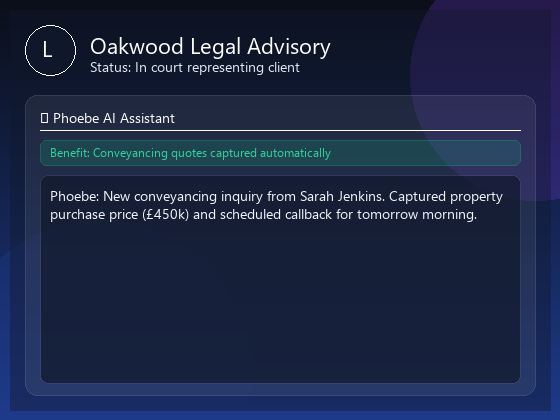
Phoebe doesn't just take a name and number — she asks the right qualifying questions to capture all the information you need to follow up or book the job without a callback.
You define exactly what information she should collect for different types of enquiry. She asks naturally and conversationally, never making callers feel interrogated.
- Customisable questions per service type
- Captures name, number, postcode, job details
- Handles booking requests with time preferences
- Politely probes for essential missing information

You're always in the loop
The moment a call ends, Phoebe sends you a full summary by SMS and email. You'll know who called, what they wanted, when they want the work done, and have a word-for-word transcript of the entire conversation.
No more missing calls and wondering what they were about. Every enquiry is captured and sent to you instantly — wherever you are.
- Instant SMS notification after every call
- Full email with transcript and caller details
- Dashboard with call history and search
- Optional team member alerts
Appointments booked automatically
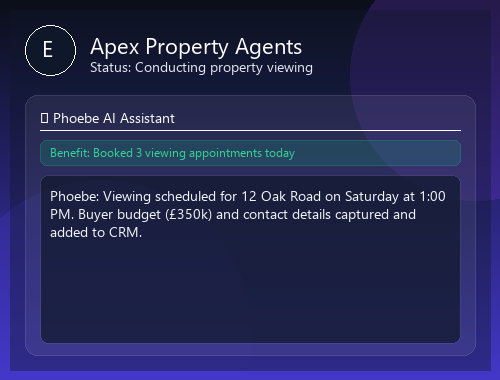
On the Professional and Premium plans, Phoebe can book appointments directly into your calendar in real time — checking your availability, offering slots to callers and confirming bookings on the spot.
Works with popular calendar systems including Google Calendar, so your appointments are in one place and visible to your whole team.
- Real-time availability checking
- Direct calendar booking without callbacks
- Confirmation texts sent to callers
- Appointment reminders to reduce no-shows

Your dashboard, your rules
The Phoebe dashboard gives you full visibility and control over your AI receptionist. Update her training, review transcripts, change her hours, and turn her on or off — all in seconds.
You can run Phoebe 24/7, only after hours, only when you're on another call, or at specific times. She works exactly when you need her to.
- Live dashboard with all call history
- Update business info and scripts anytime
- Flexible on/off scheduling
- Full call transcripts with search

Phoebe vs. the alternatives
How does an AI receptionist stack up against voicemail, a human receptionist or a call centre?
| Feature | Voicemail | Human receptionist | Call centre | Phoebe ✨ |
|---|---|---|---|---|
| 24/7 availability | ✓ | ✗ | Sometimes | ✓ |
| Natural conversation | ✗ | ✓ | Scripted | ✓ |
| Instant SMS alerts | ✗ | Manual | Sometimes | ✓ |
| Calendar bookings | ✗ | ✓ | ✗ | ✓ |
| Call transcripts | ✗ | ✗ | Sometimes | ✓ Every call |
| Monthly cost | Free | £1,500–£3,000+ | £200–£800+ | From £39 |
| Trained on your business | ✗ | ✓ | Partially | ✓ |
Everything you need to know
Do callers need to know they're talking to an AI?
You can configure whether Phoebe introduces herself as a virtual assistant or simply uses your business greeting. Many businesses choose transparency; others prefer a seamless experience. The choice is yours.
Does Phoebe work on my existing phone number?
Yes. You keep your current phone number and set up call forwarding — usually a simple code you dial on your handset. Phoebe answers the forwarded calls. Your callers always see your number.
How does Phoebe know about my services and prices?
During setup, you enter your services, pricing, business hours and any common questions you receive. Phoebe is trained on this information and updates instantly when you make changes in the dashboard.
What if Phoebe gets a question she can't answer?
If a caller asks something outside Phoebe's training, she politely explains she'll need to check and takes a message for you to follow up. You can also configure call transfers so Phoebe hands off to you directly when needed.
Can I listen back to calls?
You receive a full written transcript after every call. Audio recordings may be available depending on your plan and configuration. The dashboard stores your full call history with search functionality.
How do I switch Phoebe on and off?
Simply enable or disable call forwarding on your phone. You can also schedule Phoebe to only answer at certain times — for example, only outside your working hours or only when you're on another call.
Ready to try it yourself?
Start your free 7-day trial today. Set Phoebe up in under a minute and she'll be answering calls before you finish your next cup of tea.
7-day free trial · Unlimited minutes · Cancel anytime